
All features
Cancellations
AI cancellation letters — quit a subscription properly
Cancelling should not mean hunting for a hidden form. VesperForge writes a clear, formal cancellation letter from your subscription details, sends it to the company for you or gives you a branded PDF, and keeps the whole request on record.
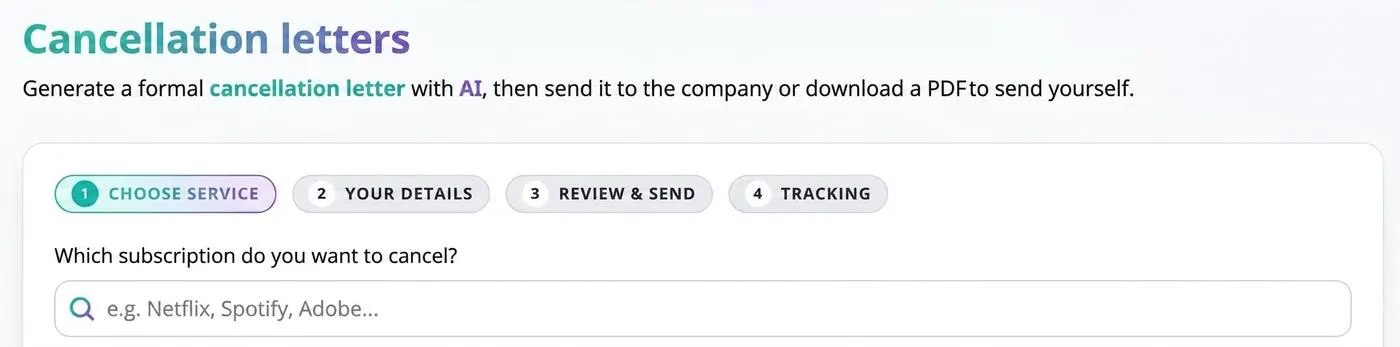
How it works
- 1
Choose the service
Search your tracked subscriptions and pick the one you want to end.
- 2
Add your details
Confirm the account name and email the company has on file so the letter is accepted.
- 3
Review and send
AI drafts the letter — send it directly, or download the PDF and send it yourself.
Benefits
- Formal, professional wording written for you
- Send directly to the company or download a branded PDF
- Every request tracked in your cancellation history
- Works from the subscription data you already have
- Share your savings once the cancellation lands
Frequently asked questions
How many letters can I generate on the Free plan?
Two per month on Free; Pro is unlimited.
Does VesperForge cancel on my behalf?
It writes and sends the formal request; the provider then processes the cancellation.
Can I keep a copy?
Yes — download the PDF at any time from your cancellation history.
Take control of your subscriptions today
Start free — no credit card required for sign up.
Get Started Free