
All features
Automation
Smart Spending Alerts — set triggers that watch your money
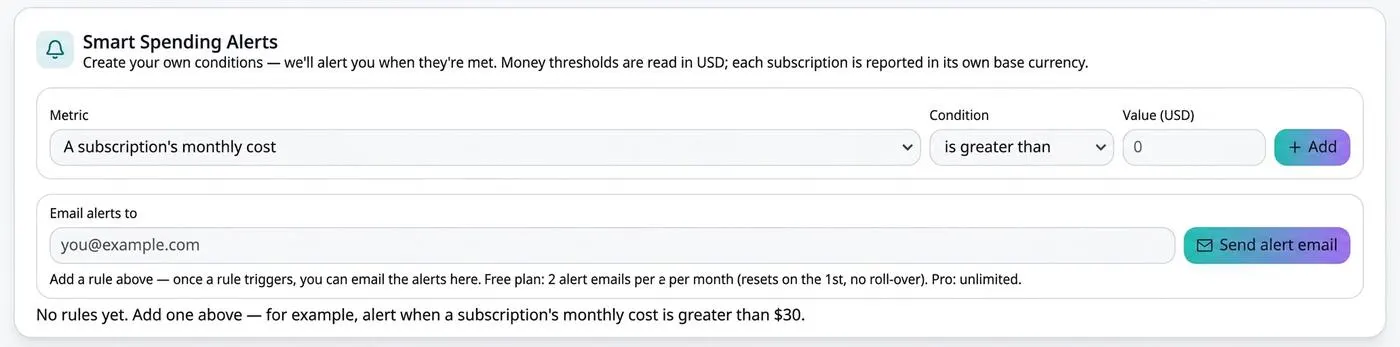
Instead of checking your subscriptions, let them check themselves. Build simple rules from a metric, a condition, and a value, and VesperForge emails you whenever one is met.
How it works
- 1
Pick a metric
A subscription's monthly cost, your total monthly spend, or another tracked figure.
- 2
Set the condition
Greater than, less than, or equal to the value you choose.
- 3
Get the email
When the rule triggers, the alert is emailed to the address you set.
Benefits
- Rules in plain language — metric, condition, value
- Catches creeping costs before they add up
- Email delivery so nothing depends on opening the app
- Money thresholds read in USD, each service shown in its own currency
- Stack as many rules as you need
Frequently asked questions
How many alert emails do I get?
Two per month on Free (resetting on the 1st, no roll-over) and unlimited on Pro.
Can I have more than one rule?
Yes — add as many conditions as you like and remove them at any time.
Is this the same as renewal alerts?
No. Renewal alerts watch billing dates; spending alerts watch amounts.
Take control of your subscriptions today
Start free — no credit card required for sign up.
Get Started Free